Understanding Infinity in JavaScript: Positive, Negative, and Practical Uses
JavaScript, the backbone of modern web development, handles numbers in unique ways that can sometimes surprise developers. One such concept is Infinity, a special value that represents numbers too large (or too small) to fit within JavaScript’s numerical limits. Whether you’re a beginner debugging unexpected outputs or an experienced coder optimizing calculations, grasping Infinity can prevent bugs and enhance your code’s robustness.
What is Infinity in JavaScript?
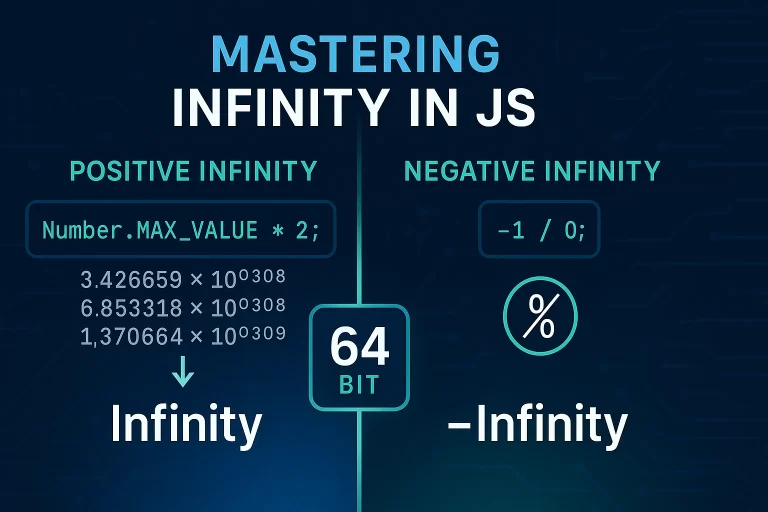
Infinity isn’t just a mathematical abstract; in JavaScript, it’s a built-in value that’s greater than any finite number (for positive Infinity) or less than any finite number (for negative Infinity). It’s part of the IEEE 754 floating-point standard, which JavaScript uses to store numbers in a 64-bit format. When a calculation exceeds what this format can hold, JavaScript returns Infinity instead of crashing or throwing an error.
Think of it as JavaScript’s way of saying, “This number is too big (or too small) for me to handle precisely!” This behavior is handy in scenarios like scientific computations, financial modeling, or games where extreme values might occur.
Positive and Negative Infinity: The Basics
JavaScript provides constants to access these values directly:
Number.POSITIVE_INFINITY: Represents positive Infinity.Number.NEGATIVE_INFINITY: Represents negative Infinity.
Example:
console.log(Number.POSITIVE_INFINITY);  // Output: Infinity
console.log(Number.NEGATIVE_INFINITY); // Output: -Infinity
These constants are properties of the Number object and are read-only. They’re useful for comparisons or initializing variables in algorithms that deal with unbounded ranges.
When Does Infinity Appear in Your Code?
Infinity typically shows up in three common scenarios:
- Exceeding Numerical Limits with Large Numbers: JavaScript’s 64-bit format has a maximum safe value. Anything beyond that overflows to Infinity.
- Using Scientific Notation for Huge Values: The ‘e’ notation (e.g., 9e4 for 90,000) can quickly push numbers over the edge.
- Division by Zero: Unlike many languages that throw errors, JavaScript gracefully returns Infinity for divisions like 1 / 0.
Exceeding Limits with Number.MAX_VALUE
The Number.MAX_VALUE constant gives the largest representable number in JavaScript (approximately 1.7976931348623157e+308). Multiplying it by a number greater than 1 causes an overflow:
console.log(Number.MAX_VALUE * 2);  // Output: Infinity
console.log(-Number.MAX_VALUE * 2); // Output: -Infinity
Scientific Notation Gone Wild
Scientific notation is a shorthand for large numbers. For instance, 9e4 means 9 followed by 4 zeros (90,000). But crank it up to 9e400, and you’re in Infinity territory:
console.log(9e400);   // Output: Infinity
console.log(-9e400);  // Output: -Infinity
Division by Zero: A Special Case
In most programming languages, dividing by zero triggers an error. JavaScript, however, returns Infinity:
console.log(1 / 0);   // Output: Infinity
console.log(-1 / 0);  // Output: -Infinity
This can be a gotcha in calculations, so always validate inputs!
Validating and Handling Infinity in Your Code
To make your code resilient, check for Infinity before proceeding with calculations. Use simple if statements:
let result = someCalculation();  // Assume this might return Infinity

if (result === Number.POSITIVE_INFINITY) {
    console.log("Value is too large!");
} else if (result === Number.NEGATIVE_INFINITY) {
    console.log("Value is too small!");
} else {
    console.log("Valid result:", result);
}
JavaScript also offers the isFinite() method to check if a value is finite (not Infinity or NaN):
console.log(isFinite(Infinity));  // Output: false
console.log(isFinite(42));        // Output: true
This is especially useful in user-input scenarios or API responses where extreme values might sneak in.
Key JavaScript Number Constants and Methods
Here’s a handy table summarizing important constants and methods related to Infinity:
| Constant/Method | Description | Example Usage | Output Example |
|---|---|---|---|
Number.POSITIVE_INFINITY |
Represents positive Infinity | console.log(Number.POSITIVE_INFINITY) |
Infinity |
Number.NEGATIVE_INFINITY |
Represents negative Infinity | console.log(Number.NEGATIVE_INFINITY) |
-Infinity |
Number.MAX_VALUE |
Largest representable positive number | console.log(Number.MAX_VALUE * 2) |
Infinity |
isFinite(value) |
Checks if a value is finite (not Infinity/NaN) | isFinite(1 / 0) |
false |
| Division by Zero | Returns Infinity for positive, -Infinity for negative | 1 / 0 |
Infinity |
Why Infinity Matters: Real-World Applications
Infinity isn’t just theoretical—it’s practical! In game development (e.g., simulating endless space), data analysis (handling overflows in large datasets), or even UI logic (preventing crashes from invalid math), understanding Infinity ensures your apps run smoothly. Plus, it’s a common interview topic: “What happens when you divide by zero in JS?” Knowing the answer sets you apart.
FAQs: Common Questions About Infinity in JavaScript
What is the difference between positive and negative Infinity in JavaScript?
Positive Infinity is greater than any number, while negative Infinity is less than any number. They arise from overflows in positive or negative directions.
How can I check if a value is Infinity?
Use strict equality: value === Infinity for positive, or value === -Infinity for negative. Alternatively, !isFinite(value) catches both.
Does JavaScript throw an error for division by zero?
No, it returns Infinity (or -Infinity) instead, making it more forgiving than languages like Python or Java.
What happens if I add a finite number to Infinity?
It remains Infinity. For example, Infinity + 42 is still Infinity.
Is Infinity the same as NaN?
No. Infinity represents an unbounded value, while NaN (Not a Number) indicates an invalid operation, like 0 / 0.
Key Takeaways
- Infinity is JavaScript’s way of handling numbers that exceed its numerical limits
- Use
Number.POSITIVE_INFINITYandNumber.NEGATIVE_INFINITYfor comparisons - Division by zero returns Infinity rather than throwing an error
- Always validate inputs and calculations with
isFinite()to prevent unexpected Infinity values - Infinity has practical applications in game development, data analysis, and scientific computing